
Flight Tracker-Live Air Radar
Kafadengi BilisimTravel & Local
3.3151.00 Reviews
- Version
- 3.2
- Installs
- 1.00M
- Age Rating
- Everyone
Screenshots

Our Review of Flight Tracker-Live Air Radar
 Analysis by Appyee
I tend to judge a flight-tracking app by what it helps me decide, not by how busy its map looks. When someone is flying, I want a quick way to check whether the plane is moving and whether the arrival picture has changed. When I’m meeting a traveler, I want to know whether it is worth leaving for the airport yet. Flight Tracker-Live Air Radar is built around that kind of glanceable information, with a live map and flight-status updates at its core.
That focus makes it an appealing travel and local app for people who like following a journey as it unfolds, but it is worth keeping expectations practical. A tracking map can help you understand what appears to be happening; it does not replace an airline’s instructions or guarantee that every operational change will reach your phone instantly. I see it as a useful companion for checking the situation, not the final authority for changing a booking or rushing to a gate.
Where the app stands now
Developed by Negroni, the app is free to install and has an Everyone age rating. It has an average rating of 3.2 from around 5,100 ratings, which suggests a mixed reception rather than universal approval. That is a useful reminder to try it for your own routine before depending on it as your only source of travel information.
The current version is 3.0, and the app supports Android 5.0 and later. It has passed one million installs, so it is not an obscure experiment, though popularity alone does not tell me whether its map or updates will suit a particular trip. Optional in-app purchases range from $2.99 to $29.99 per item, so I would check what is included and whether it matters to my own use before paying.
What the version history tells me—and what it doesn’t
The app was released on February 6, 2023, and version 3.0 is the current version. That gives a reader a basic sense of its timeline, but a version number by itself does not explain which screens or behaviors have changed. I would not assume that a particular tool is new, recently improved, or more reliable just because the version number has advanced.
For someone already using it, the sensible approach is to judge the current build by the tasks that matter: can you find the flight you need, can you read its status quickly, and does the map make the route easier to understand? If you have an older installation, check the app’s current interface after updating rather than relying on remembered steps. That is especially useful when you are preparing for a trip, because a familiar-looking tracker can still present information differently after a version change.
Using the map without mistaking it for an airline desk
On an ordinary travel day, I would use the map to get context and then compare important decisions with the airline’s own app, airport displays, or staff. A live position can make a flight’s progress easier to picture, while a carrier remains the place I would look for instructions about check-in, boarding, baggage, or rebooking. Keeping those roles separate prevents a helpful map from becoming an unreliable substitute for official travel guidance.
A practical routine for travelers and people meeting them
Imagine a friend is arriving while you are still at home. Instead of leaving as soon as they send a boarding message, you can look up the flight and use its status and map to get a better sense of progress. Then check the airline or airport information before setting off, especially if the pickup depends on a changed arrival time. The benefit is not perfect prediction; it is having more context before you make the drive.
For your own journey, I would search for the flight before heading to the airport and make sure I have the right route or flight number. Once I have found it, I would use the tracker for quick checks rather than keeping the map open continuously. That small habit is practical on a travel day: it reduces unnecessary screen time and helps avoid draining the phone while you still need it for tickets, messages, and navigation.
The same approach suits people who follow aircraft out of curiosity. Pick a flight and watch how the map turns an abstract timetable into a route you can follow. I find that more engaging than repeatedly refreshing a list of times, but it is a different kind of value from a traveler’s need to resolve a delay or missed connection.
How it fits beside familiar alternatives
Compared with an airline’s own app, a dedicated tracker is more about viewing a flight’s movement and status in a broader map context. The airline app is usually the more sensible first stop for account-specific trip details and instructions. Compared with an airport departures board, a tracker offers a way to follow movement rather than just scan a list of flights, while the board is often simpler when you are already inside the terminal and only need the latest local information.
Those tools are complementary, not interchangeable. I would choose this app when seeing a route or checking a flight’s progress is the main question. I would lean on the carrier or airport when the next step involves a gate, a connection, a ticket, or a service disruption. If you only travel occasionally and already get everything you need from the airline’s app, adding another tracker may not make your day noticeably easier.
Small habits that make tracking more useful
One practical tip is to treat flight identification as the first task, not an afterthought. If you are tracking someone else’s trip, ask for the flight number or confirm the route before relying on a map result; similar city pairs or multiple daily services can make a casual search confusing. Once the correct flight is selected, use the map for context and the status for a quick check, rather than trying to infer every operational detail from the aircraft’s position.
Another useful trade-off is deciding when to open the app. A live map is most valuable when a concrete question has come up—whether a plane appears to be underway, or whether an arrival is close enough to change pickup timing. Leaving any tracker running as a constant monitor is rarely necessary for that job and can cost battery. I would close it between checks and keep the airline’s own notifications available for decisions that require an official response.
Limitations worth weighing before relying on it
Real-time tracking depends on having a connection, so a weak signal can make a map less useful precisely when you are moving through a station, terminal, or unfamiliar area. I would not wait until the last minute to look up a flight if I know connectivity may be unreliable. Check the details while you have a dependable connection, then use other available travel information if the app does not refresh as expected.
There is also a difference between seeing a plane’s progress and knowing what a traveler should do next. A status view cannot settle questions about rebooking, boarding requirements, or baggage arrangements. If an update could affect a connection or pickup plan, confirm it with the airline or airport before acting. That extra check is a small inconvenience, but it is the right trade-off when the consequences of a mistaken assumption are high.
For an occasional user, the free install makes it easy to try the basic experience, but the presence of paid items means I would look carefully at any purchase prompt. I would not pay simply because I want a map; first decide whether the free version answers the questions you actually have. The app is a weaker fit for anyone who expects a flight tracker to manage the whole trip, or who prefers to keep travel information inside one airline account.
Who I think will get the most from it
I would recommend giving it a try if you regularly meet people at airports, enjoy following aircraft, or want a map-based view alongside your usual travel tools. It is also useful for a family member checking a relative’s progress without asking for repeated messages. The best fit is someone who wants a quick visual check and understands that the result is one piece of the travel picture.
I would skip it if you only need a boarding pass and gate notice, since an airline’s app is a more direct tool for those tasks. It may also be unnecessary if you dislike maintaining several travel apps or if you need a tracker to make firm promises about arrival timing. In those cases, the simplest option is often the carrier’s own service, paired with airport information when you are on site.
First impressions and interface
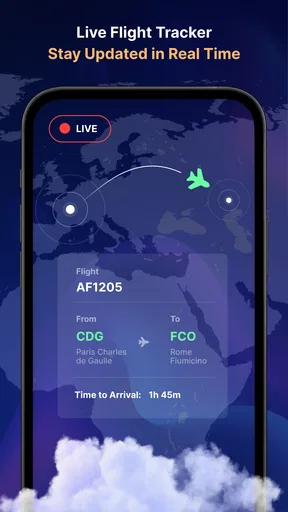
Right off the bat, Flight Tracker-Live Air Radar impresses with its sleek and intuitive design. Once you fire up the app, you’re greeted with a vibrant map dotted with tiny airplanes, each representing a real-time flight. The interface is user-friendly and doesn’t overwhelm you with unnecessary information—just the essentials for flight tracking.
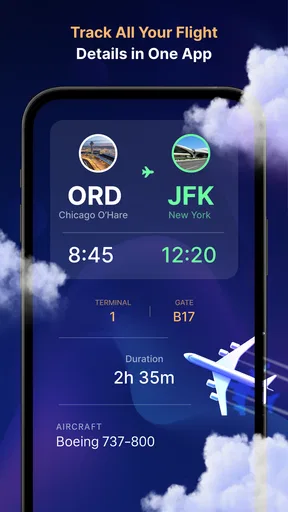
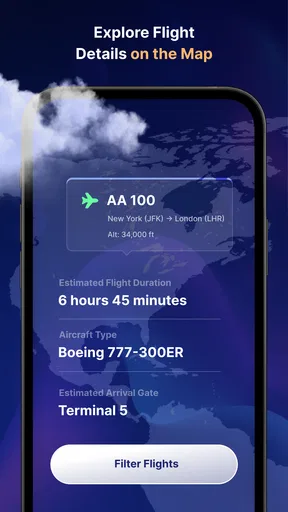
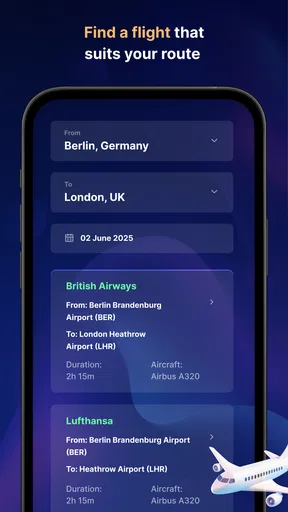
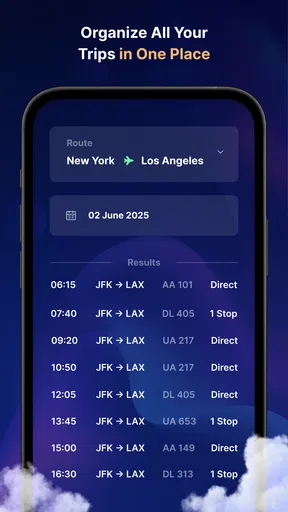
Navigation through the app is a breeze. The search function is prominently displayed, allowing you to quickly find flights by flight number, airline, or even the route. I found it pretty neat that you can simply tap on any airplane icon to get detailed info about the flight, such as departure and arrival times, altitude, speed, and more.
Features that stand out
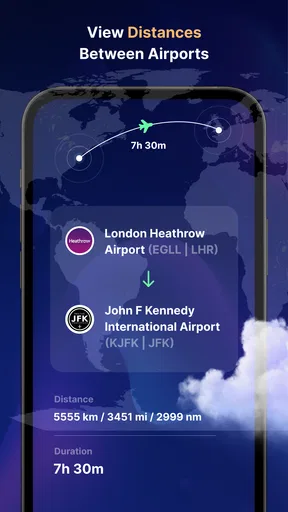
This app packs a punch with features that air travel enthusiasts and frequent flyers will love. Aside from the basic tracking, it offers detailed flight paths and weather overlays, giving you a comprehensive understanding of the flight’s journey. The weather overlay is especially helpful, offering insights into potential delays caused by atmospheric conditions.
One of my favorite features is the alert system. You can set up notifications for specific flights, so you’re always in the loop about delays, gate changes, or cancellations. This is a lifesaver for anyone who hates the uncertainty of travel plans.
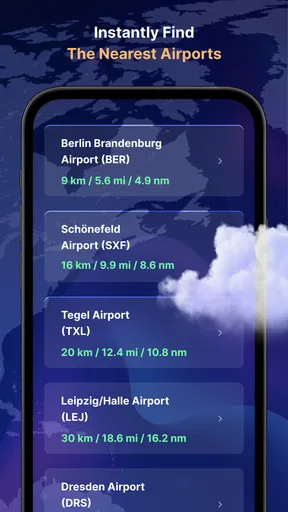
The app also allows you to explore airports. You can check on the current conditions, delays, and even browse a virtual map of the airport terminals. It’s like having a mini airport guide in your pocket!
Performance and reliability
Let’s talk about how this app performs. During my time using it, I found it to be incredibly reliable. The updates are swift, and the information seems accurate. However, like any app reliant on real-time data, there might be occasional hiccups, especially in areas with poor internet connectivity.
Battery consumption is another thing I noticed. Since it’s constantly pulling data, the app can be a bit of a battery hog if left running in the background for too long. It’s something to keep in mind if you’re on the go and need to conserve juice.
Why should you use it?
So, why should you download Flight Tracker-Live Air Radar? If you’re a frequent traveler, this app is a must-have. It offers peace of mind by providing real-time updates on your flights, helping you stay ahead of any travel hiccups. For aviation enthusiasts, it’s a treasure trove of information and a fun way to explore the skies.
Even if you’re just a curious onlooker, there’s something fascinating about watching flights crisscrossing the globe. It’s a reminder of how interconnected we all are, with people jetting off to various corners of the world.
What I would watch for
For me, the fairest way to assess any future version is to see whether it makes everyday tracking more dependable and less effortful. I would pay attention to whether flight searches remain easy to repeat, whether the map and status tell a consistent story, and whether alerts arrive in time to be useful. Those are the details that matter more to a traveler than a longer feature list.
I would also keep an eye on how the paid options fit into the experience. With items priced from $2.99 to $29.99, the difference between trying the app and investing in extras is meaningful. If the basic tools already answer your questions, there may be no reason to spend. If a paid option seems relevant, first make sure it solves a recurring need rather than a one-off curiosity.
Final thoughts
In a nutshell, Flight Tracker-Live Air Radar is an impressive app that does what it sets out to do—track flights with precision and ease. While it’s not without its minor flaws, the overall experience is smooth and satisfying. Whether you’re managing travel plans or simply indulging a curiosity about aviation, this app is worth checking out.
So, if you’re ready to take your flight tracking game to the next level, head over to the app store and give it a whirl. The sky is literally the limit!
Verdict
Strengths of Flight Tracker-Live Air Radar
- Real-time flight updates enhance travel planning.
- User-friendly interface for easy navigation.
- Covers global air traffic comprehensively.
- Custom alerts for flight status changes.
- Detailed aircraft information available.
Limitations of Flight Tracker-Live Air Radar
- In-app ads can be distracting.
- Requires internet connection for updates.
- Limited offline features.
- Some features locked behind paywall.
- Occasional data syncing delays.
Other Releases by Kafadengi Bilisim
View All
AI Avatar Creator & Cartoonify
Art & Design4.6
Similar Picks in This Category
View All
Google Maps
Google LLC3.4

Google Maps Go
Google LLC4.1

Booking.com: Hotels & Travel
Booking.com Hotels & Vacation Rentals4.8

Google Earth
Google LLC3.8

Skyscanner Flights Hotels Cars
Skyscanner Ltd4.8

trivago: Compare hotel prices
trivago N.V.4.4
Frequently Asked Questions
What features does Flight Tracker-Live Air Radar offer?
Flight Tracker-Live Air Radar provides real-time tracking of flights worldwide. Users can view flight paths, live status updates, and detailed information on arrivals and departures. The app also offers airport information, weather updates, and alerts for changes in flight schedules. It's a comprehensive tool for frequent travelers and aviation enthusiasts.
Is Flight Tracker-Live Air Radar free to use?
The app offers a free version with basic features, such as tracking specific flights and accessing general airport information. For advanced features like ad-free usage, detailed flight history, and customizable alerts, users can opt for a premium subscription. This ensures a tailored experience for different user needs.
How accurate is the flight data in Flight Tracker-Live Air Radar?
Flight Tracker-Live Air Radar uses data from multiple reliable sources, including airlines and airports, to provide up-to-date information. While the app strives for high accuracy, there might be occasional discrepancies due to factors beyond its control, such as sudden schedule changes or technical issues. Users are advised to verify with airlines for critical updates.
Can Flight Tracker-Live Air Radar be used offline?
Flight Tracker-Live Air Radar requires an internet connection to access live flight data and updates. However, users can view previously accessed information offline. For the most accurate and up-to-date tracking, a stable internet connection is recommended, especially when traveling or planning flights.
Is Flight Tracker-Live Air Radar available on both Android and iOS?
Yes, Flight Tracker-Live Air Radar is available for download on both Android and iOS platforms. Users can find it in the Google Play Store and Apple App Store. The app is designed to offer a seamless experience across devices, ensuring users have access to flight information anytime, anywhere.
